

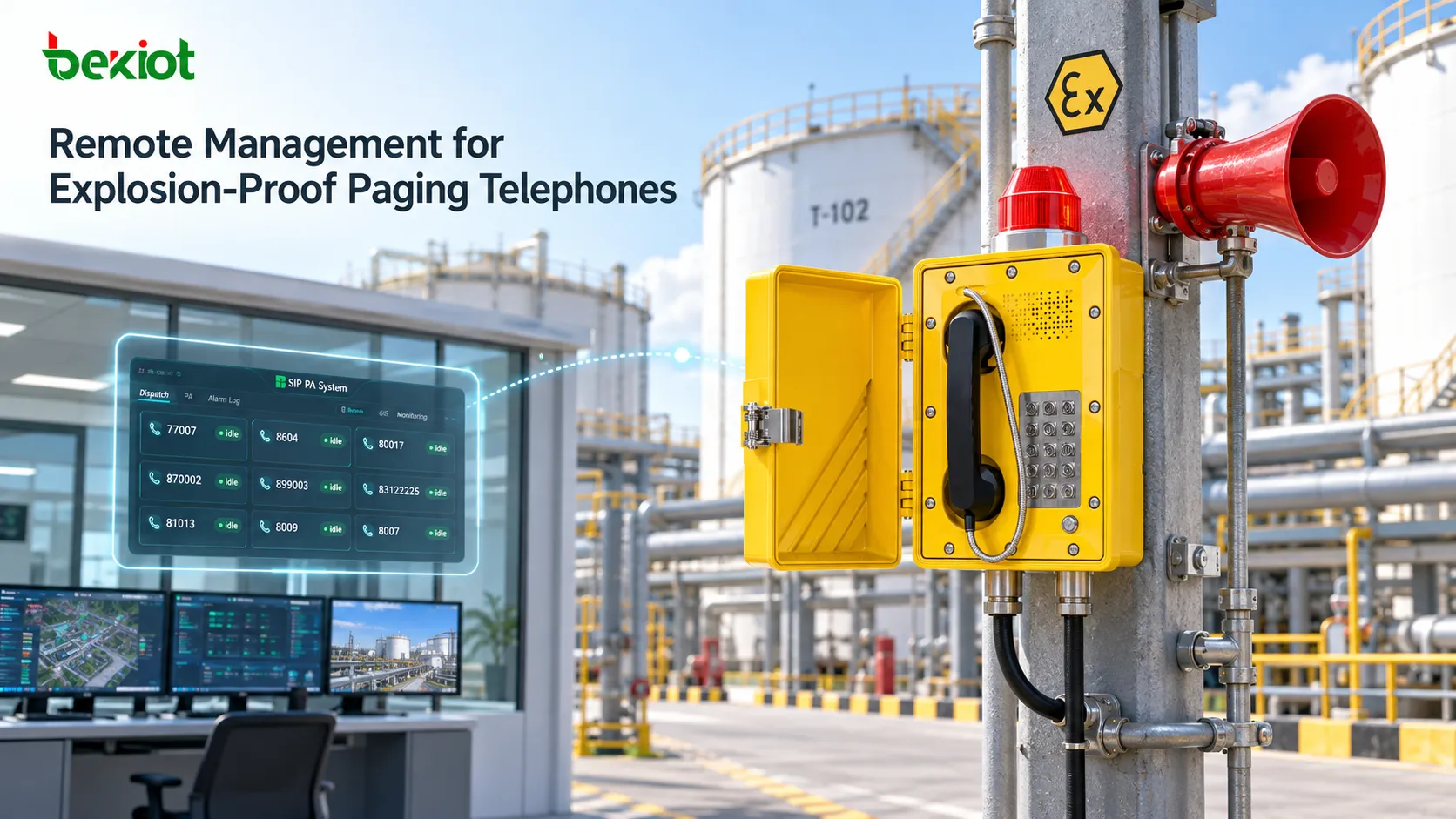
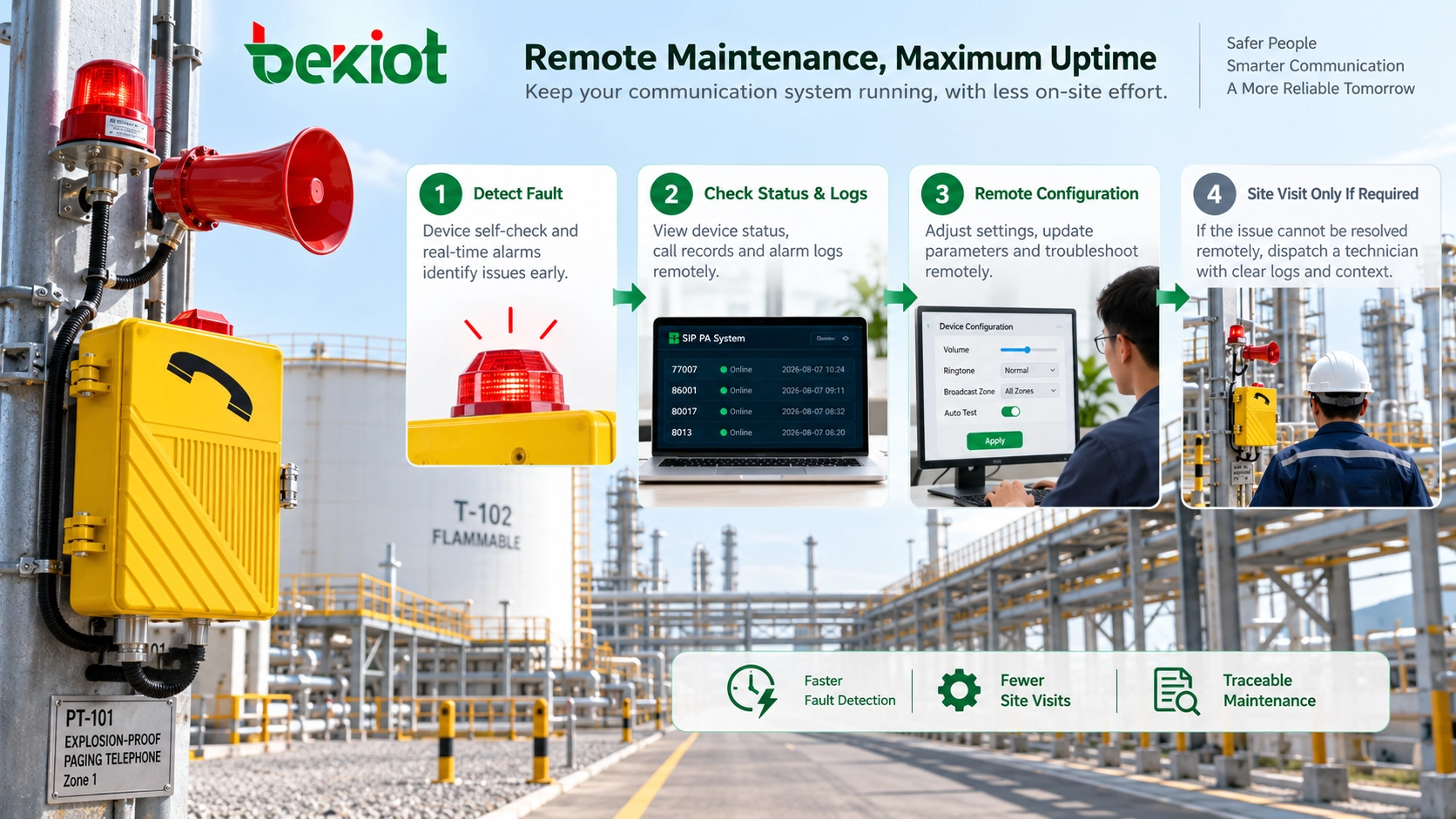
Remote management lets maintenance teams investigate loss of registration, incorrect hotline destinations or common configuration changes before entering a hazardous area. It can reduce unnecessary visits and prepare technicians for necessary field work. It never replaces inspection of the physical installation or verification of the telephone’s explosion-protection integrity.
In tank farms, petrochemical plants, gas facilities, mines, storage terminals and utility tunnels, one visit may involve travel, access controls, permits and safety checks. Across dozens or hundreds of endpoints, checking status and logs first can make a substantial operational difference without assuming that every fault can be repaired remotely.
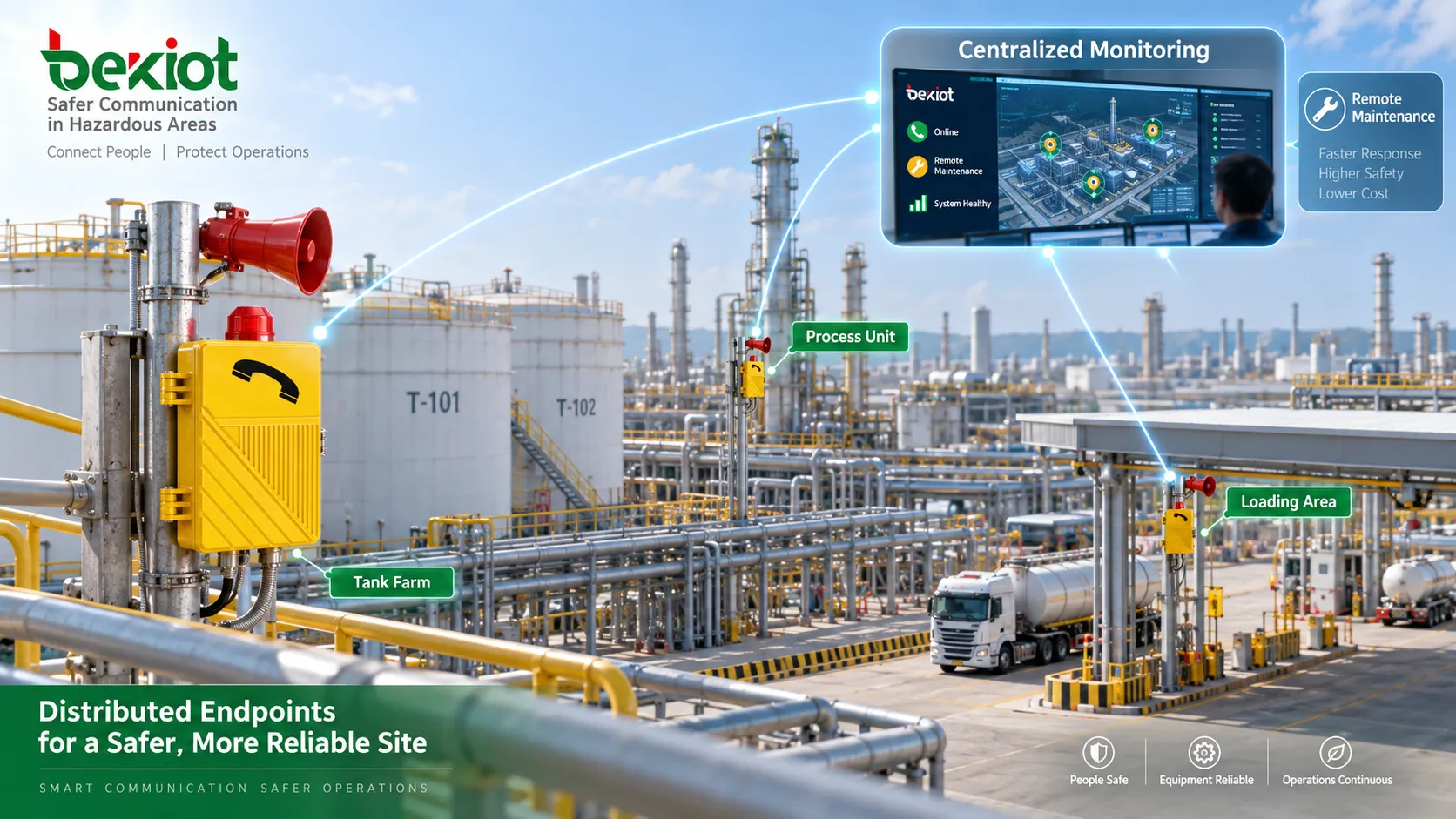
Define remote-management capabilities separately from SIP support
SIP provides session signaling. A SIP-compatible telephone does not automatically support a management platform, bulk provisioning, alarms or remote firmware upgrades. Confirm each capability for the exact terminal, SIP module, firmware and platform. “Remote control” usually concerns supported settings and software functions, rather than every hardware function.
Communication settings and hotline destinations
Depending on implementation, remote settings may include SIP accounts, Registrar or Proxy addresses, ports, extension numbers, codecs and DTMF. Server migrations and numbering changes become easier when shared parameters are applied consistently while each device keeps its own identity, address and installation location.
Hotline, Off-Hook Auto Dial, DSS keys and predefined destinations may also be configurable. Review these routes whenever control-room responsibilities or duty numbers change: a stale emergency destination can remain unnoticed until someone needs it. Confirm the actual answering position after each change.
Network and audio settings
Some terminals expose DHCP, static IP, DNS, VLAN, NTP, ringing, hands-free volume or loudspeaker settings. Remote adjustment is useful only where supported and authorized. Noise, mounting height, reflections and operator position still determine intelligibility; a volume value on a screen does not establish acceptable field audio.
Backups, provisioning and software updates
Configuration backup, restore, automatic provisioning, batch changes and firmware upgrades require explicit product support. Before an upgrade, verify hardware revision, current version, permitted upgrade path, compatibility and recovery instructions. Confirm that the change respects the equipment documentation and any certification-related restrictions.
Back up approved settings, test on a small non-critical group and expand by area after registration, calling, paging and management pass. Keep a practical recovery method and maintenance window. An upgrade that loses network access may require local intervention; remote rollback cannot be presumed.
Use centralized monitoring to isolate the fault layer
A web page for each telephone is useful, but still requires individual checks. A centralized view can correlate reachability, SIP registration, IP address, software version, uptime and alarms where the devices and platform report them. Its value is recognizing the scope and timing of a fault, rather than treating a green icon as proof of service.
If several phones in one area disappear together, investigate shared PoE switching, power or the fiber uplink. For one offline device, examine its port, cabling, supply and terminal. These are diagnostic priorities, not proof of a failed component; field checks remain necessary when the evidence is incomplete.
If IP access works but registration fails, review the account, authentication, server address, DNS and call-control service. If many areas lose registration together, examine shared servers, core networking and recent bulk changes. A registered endpoint can still have failed routing, RTP, microphone, loudspeaker or remote answering equipment.
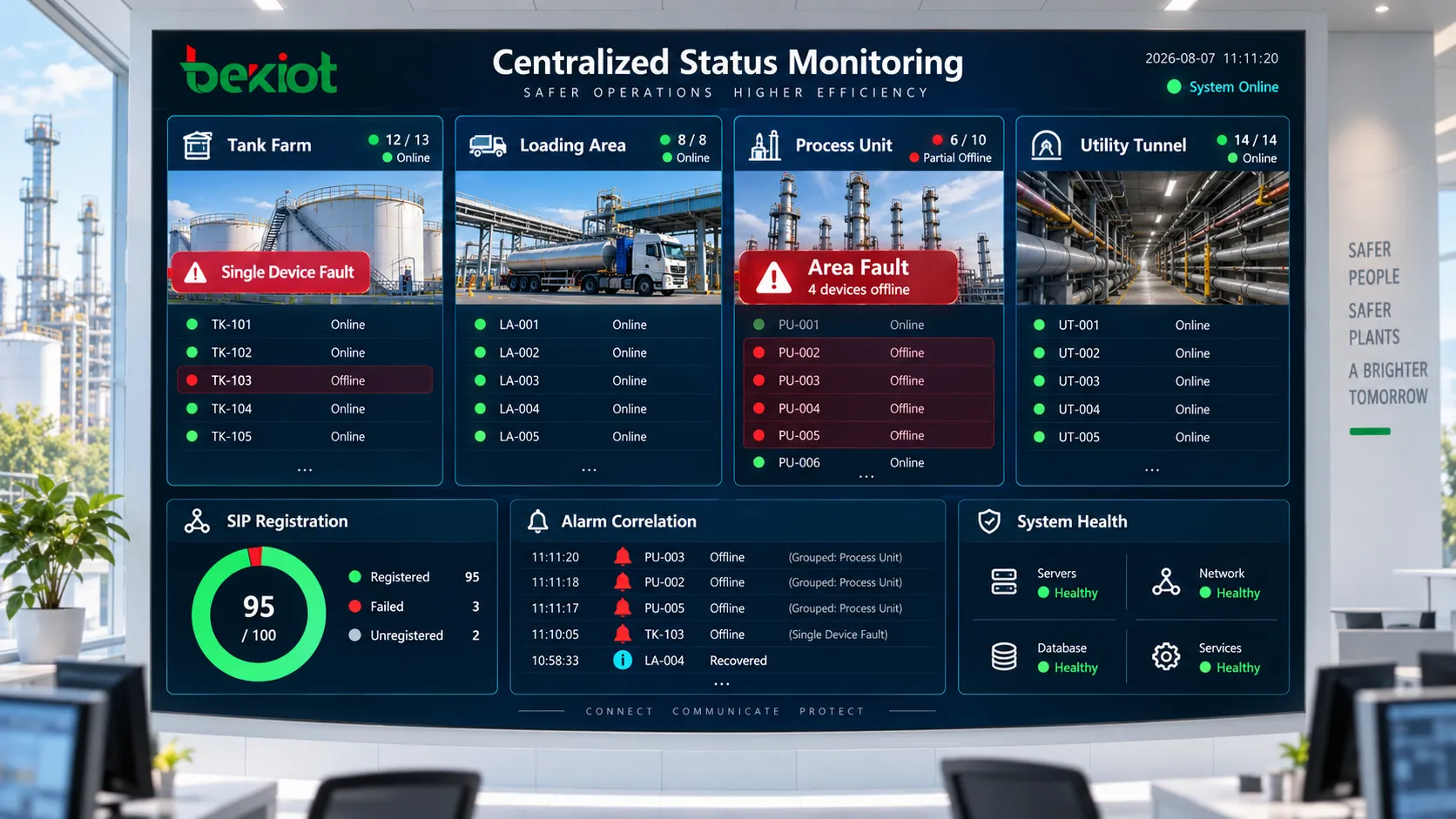
Standardize configuration without losing device identity
For large or multi-site systems, separate global settings such as server addresses, NTP and security policies from area settings such as permissions, paging groups and approved audio policies. Device settings retain the unique extension, IP address, location and hotline destination. Document which layer overrides another to avoid unintended replacements.
Approved templates support preconfiguration, phased expansion and platform migration. Apply common changes to selected groups, verify the result and retain device-specific records. Backups help replacement units recover approved settings; templates alone do not prevent drift unless changes are reviewed and the deployed configuration is checked.
Measure maintenance benefits through the workflow
Earlier alarms can reveal an unused emergency telephone’s outage before an incident. Remote diagnostics can distinguish likely configuration or network problems from faults requiring tools, spare parts and authorized site access. Technicians can then enter with a defined task instead of beginning an unprepared investigation.
Where the platform provides audit records, retain logins, settings changed, affected devices, software versions, alarm times and recovery times. Time synchronization and location-based device names make these records useful across shifts and future maintenance teams. No numerical saving or guaranteed fault-detection interval follows from remote access alone.
Keep physical inspection and real voice testing
Online status does not establish enclosure integrity, secure fasteners, sound cable entries, seals, handset condition, free-moving keys, firm mounting or acceptable loudspeaker output. Inspection and any repair affecting certified structures must follow the equipment instructions, site procedures and applicable hazardous-area requirements, with competent personnel.
The IEC 60079 framework distinguishes installation and initial inspection, inspection and maintenance, and repair. A dashboard is not a substitute for these activities. Continue required physical inspections even when every endpoint is reachable; remote diagnosis must not be used to defer an inspection required by the site’s programme.
SIP registration associates an address with contact information; it is not an end-to-end voice test. Periodically place real two-way calls and verify paging at the field loudspeakers. After changing accounts, servers, codecs or network settings, retest dialing, audio and all project-critical functions under actual operating conditions.
Secure access and limit the impact of bulk changes
Replace default credentials and distinguish status viewing from configuration and software-update privileges where supported. Restrict management access through approved network segmentation, firewall rules and controlled remote access such as a VPN. Use supported secure management transport; do not expose an endpoint’s management interface directly to the public Internet for convenience.
Record who changed what, when and on which devices. Protect configuration backups and account secrets. A single incorrect server address pushed plant-wide can disable otherwise healthy phones, so require review, backup, a pilot group, a defined deployment scope and a recovery plan for significant changes.
Specify and commission the complete maintenance service
Define whether the project needs individual web access or centralized fleet monitoring before procurement. Specify required alarms, batch provisioning, backups, version control and update support. Plan the management VLAN, control-room reachability, cross-site access and roles alongside the voice network rather than adding them after installation.
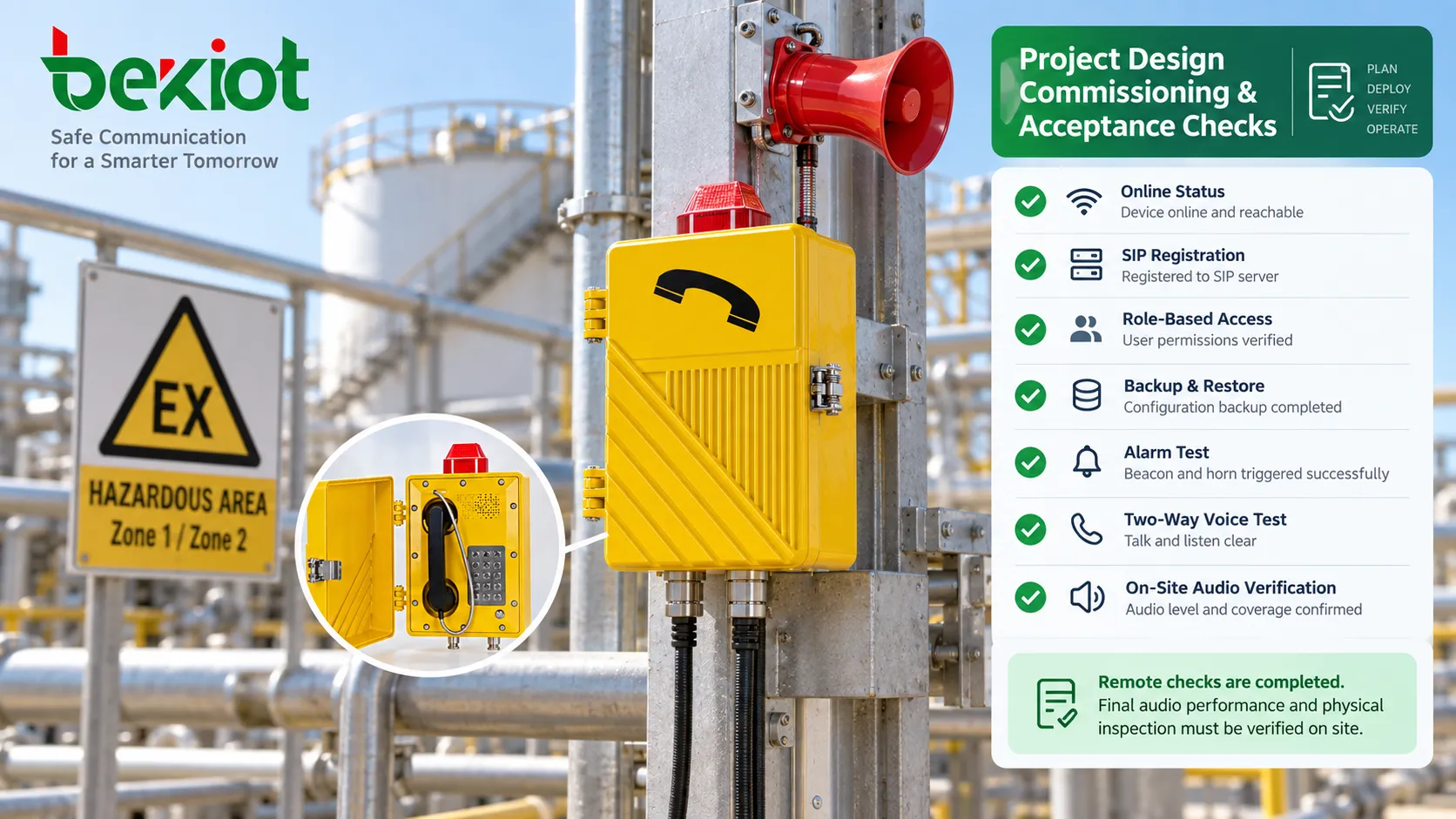
Acceptance should demonstrate a real maintenance task: read status from the control room, change an approved non-critical setting, confirm its effect, restore a backup, simulate an outage and check the alarm. Verify permission differences and, where updates are required, demonstrate upgrade and recovery on controlled test equipment.
Finish by testing the service itself. “Configuration successful” proves neither correct routing nor intelligible audio. Record the terminal, location, software, route, answering position and outcome so later teams can distinguish a management problem from a communication or physical-installation problem.
FAQs
Do all SIP explosion-proof paging telephones support centralized management?
No. Confirm monitoring, provisioning, alarms, backup and software-update support separately for the exact hardware, firmware and platform. SIP compatibility alone does not establish these functions.
Can remote access remove the need for hazardous-area inspections?
No. It can reduce visits made only to investigate status or settings, but it cannot verify physical protection integrity or replace required inspections and field audio checks.
Should every terminal be upgraded at once?
Only after the project’s validation and change process justifies the scope. Normally, first verify compatibility and recovery on a small group, then deploy in controlled batches while preserving approved settings.
How should cross-site maintenance be provided?
Use the organization’s approved remote-access environment with restricted sources and privileges. Confirm that access controls, audit records and recovery remain usable if the primary management service fails.
Becke Telcom supplies hazardous-area telephones and paging and dispatch integration equipment. Plan any centralized maintenance requirement against the selected models, existing network and site procedures; the architecture description does not certify a particular installation or guarantee optional functions.
Technical references
IECEx: IEC 60079 standards for installation, inspection, maintenance and repair.