

Bách khoa toàn thư
2026-11-02 14:33:44

URR trên N4 đo lường và báo cáo lưu lượng 5G như thế nào?

URR liên kết đo lường lưu lượng UPF với điều khiển SMF thông qua PFCP. Liên kết PDR, cờ đo lường, ngưỡng, hạn mức, quy trình báo cáo và ranh giới tính cước giải thích các báo cáo lưu lượng bị thiếu hoặc không mong đợi.

Becke Telcom

URR trên N4 đo lường và báo cáo lưu lượng 5G như thế nào?

A UE can register and establish a PDU Session, with packets forwarded correctly, while the SMF receives no expected usage updates. Check the Usage Reporting Rule (URR): the SMF provisions it over N4 using PFCP, and the UPF measures traffic and reports under the configured conditions. Usage reports support charging, monitoring and policy decisions; complete charging requires additional functions and procedures.

Where URR fits among PFCP rules

A Packet Detection Rule (PDR) identifies traffic and references applicable rules. A Forwarding Action Rule (FAR) specifies forwarding, dropping or buffering; a QoS Enforcement Rule (QER) controls QoS and gating; a Buffering Action Rule (BAR) supplies associated buffering instructions. URR defines usage measurement and reporting, with quota-related behavior where configured.

One PDR can reference multiple URRs, and several PDRs can share a URR. Confirm the matching PDR, its URR ID references and the intended aggregation scope. A URR may exist without a PDR association, but its presence alone does not demonstrate that the test traffic is being measured.
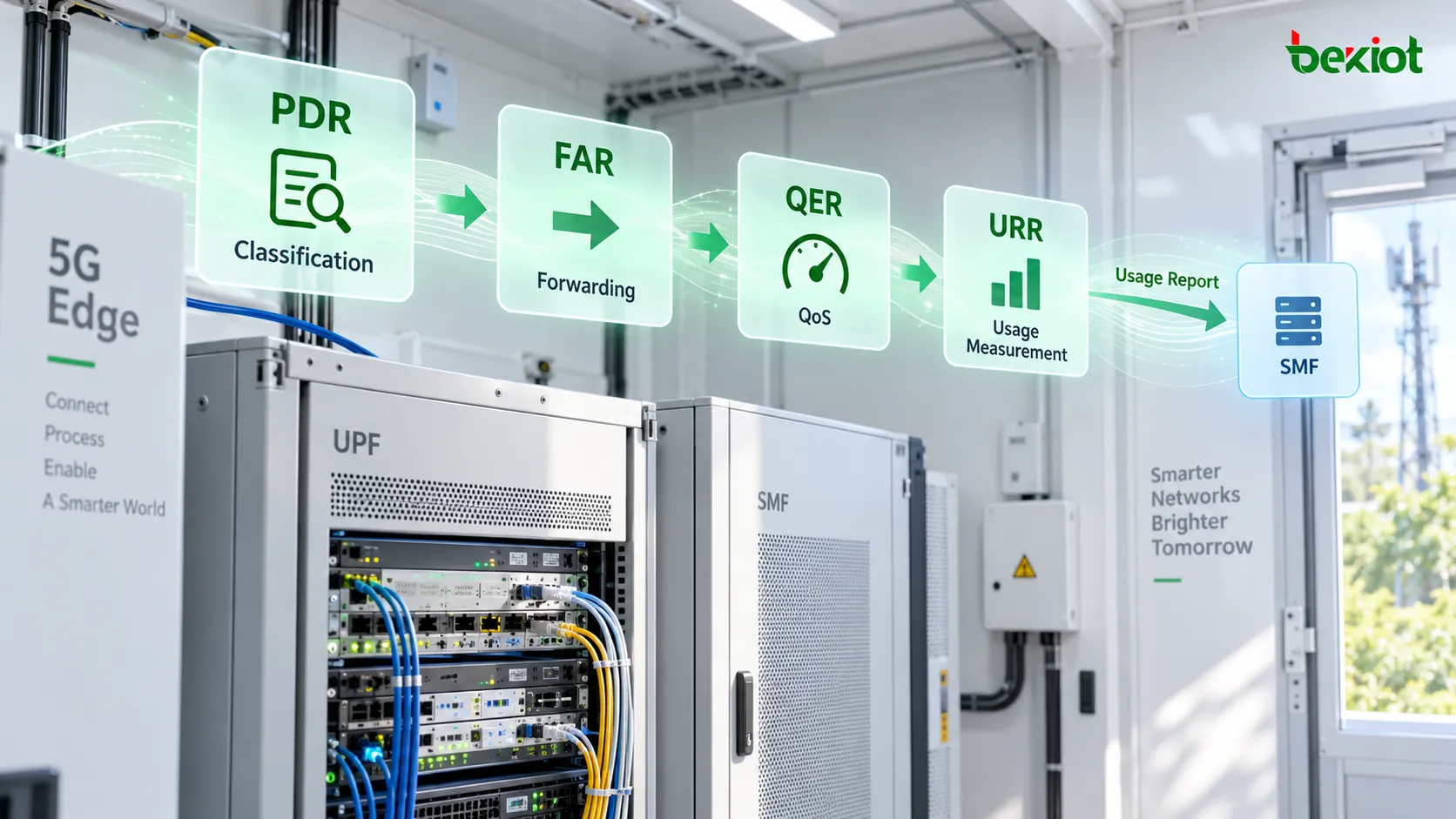
Illustration of PDR, FAR, QER and URR roles beside UPF and SMF equipment
The association relationship in the N4 interface: The PDR first identifies and classifies the user traffic, and then references the URR, enabling the UPF to measure the matching traffic and report the usage to the SMF.

Measurement Method and accounting scope

Measurement Method selects volume, duration, events or supported combinations. Volume Measurement reports total, uplink and downlink octets; an octet is a byte. MNOP in Measurement Information additionally requests packet counts when the UPF supports that feature. Do not confuse byte counters, packet counters and application payload sizes.

Duration measurement depends on the time-metering configuration. Immediate Start Time Metering can start measurement when instructed; otherwise it starts with the first packet. A nonzero Inactivity Detection Time suspends time measurement after the configured inactivity interval and resumes it when traffic returns. Event measurement requires the corresponding event-detection configuration.

For volume measurement, reporting normally covers usage after QoS enforcement. If measurement before QoS enforcement is also requested, separate Usage Reports distinguish the two scopes through Usage Information. Thresholds apply after QoS enforcement. Compare the same direction, accounting window and processing scope before declaring a counter mismatch.

Reporting triggers, thresholds and quotas

Reporting Triggers must be read with their parameters: PERIO uses Measurement Period; VOLTH, TIMTH and EVETH concern volume, time and event thresholds; VOLQU, TIMQU and EVEQU concern quotas. START and STOPT report traffic start and stop under the applicable detection conditions. Quota Holding Time concerns inactivity after a grant; it is not the periodic reporting timer.

ParameterMeaning and boundary
Volume ThresholdA reporting boundary, not a traffic allowance or an automatic packet cutoff.
Volume QuotaAn allocated usage allowance. Exhaustion can require stopping or limiting forwarding under the specified quota behavior.
Measurement PeriodThe interval used for requested periodic usage reports.
Monitoring TimeA boundary separating usage before and after a specified time, with applicable subsequent thresholds or quotas.

Quota behavior is more than a notification. Under TS 29.244, exhausting a provisioned quota can stop forwarding or allow only limited traffic according to operator policy. When supported and provisioned, FAR ID for Quota Action selects a substitute FAR for dropping, buffering or redirecting traffic. QER and FAR/BAR responsibilities still remain distinct; a threshold-only URR is not a bandwidth limiter.

When both threshold and quota are provisioned, enabling only the threshold trigger does not imply a second report at quota exhaustion. With both triggers enabled, the reviewed Release 18 specification provides reporting at both boundaries; older release behavior can differ. Inspect the implemented release, capabilities, exemptions and complete rule set.
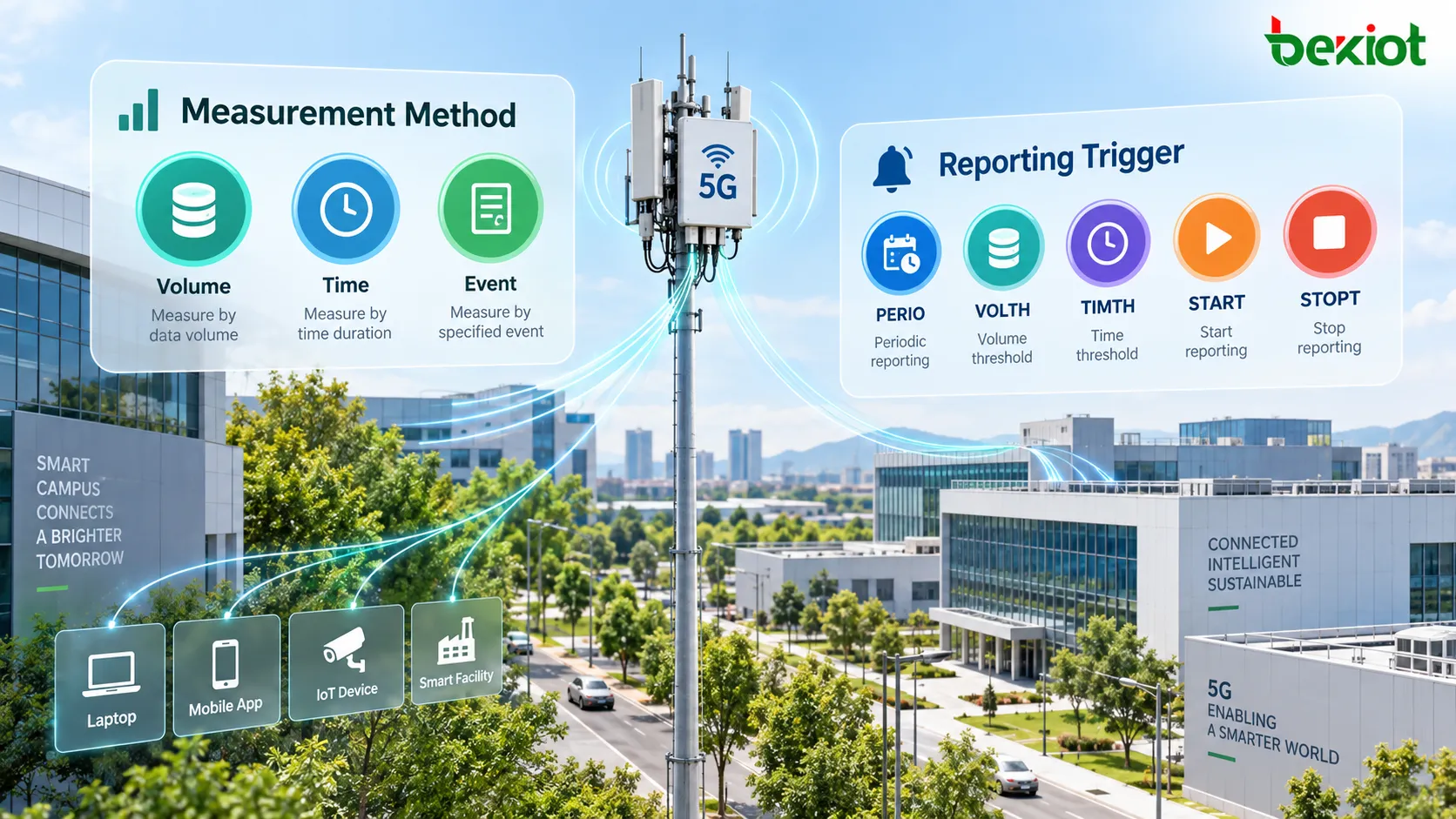
Illustrated volume, time and event measurement methods with PERIO, VOLTH, TIMTH, START and STOPT triggers
Measurement selects what is counted; triggers and their associated parameters determine reporting conditions.

How a Usage Report reaches the SMF

The UPF can send a PFCP Session Report Request with Report Type indicating a Usage Report. Inspect URR ID, UR-SEQN and Usage Report Trigger, then Volume Measurement or Duration Measurement as applicable. Start Time, End Time and packet timestamps help delimit the interval. A START-only report need not contain a nonzero usage measurement.

The SMF returns a PFCP Session Report Response; inspect its Cause. Successful delivery does not prove successful charging or a quota renewal. The SMF can separately send a PFCP Session Modification Request to update rules. Usage Reports can also appear in PFCP Session Modification Response and PFCP Session Deletion Response under their applicable procedures, so searching only unsolicited requests can miss accounting records.

Monitoring Time can produce separate reports for usage before and after the boundary with the same URR ID. Retain Usage Information and sequence information, distinguish retransmissions from new reports, and reconcile the reported intervals rather than treating every value as a lifetime counter.

Example: a 10240-byte volume threshold

Assume volume measurement, VOLTH and a total Volume Threshold of 10240 bytes with TOVOL set. The UPF reports when the measured total reaches that boundary; the value is not a 10240-byte allowance. Packet granularity can produce a report above the threshold. The configured quota, if any, must be analyzed separately.

UPF usage illustration with a 10240-byte threshold and a PFCP usage report sent to the SMF
The example uses 10240 bytes, equivalent to 10 KiB. 

A trace checklist for missing or unexpected usage

  1. Identify the PFCP session and actual matching PDR; check URR references and aggregation across uplink and downlink PDRs.

  2. Check Measurement Method, measurement activation, MNOP support, time-metering settings and before/after-QoS scope.

  3. Pair each requested trigger with its threshold, quota or timer; check Monitoring Time and subsequent values.

  4. Trace requests and responses, Cause, URR ID, UR-SEQN, reported intervals and retransmissions; include modification and deletion responses.

  5. If reporting succeeds, inspect SMF processing, charging integration, renewed quota and any applicable QER/FAR changes. Verify actual forwarding behavior separately.

FAQs

Can one URR measure both traffic directions?

Yes. Relevant uplink and downlink PDRs can reference the same URR. Check the intended aggregation rather than assuming that one URR always represents one direction or one service.

Does a Usage Report confirm that a customer was billed?

No. It confirms a UPF reporting event. Charging correlation, rating and billing outcomes require evidence from the corresponding control-plane and charging systems.

Should all URR reports be added together?

Not blindly. Reports can describe different intervals, monitoring boundaries or before/after-QoS scopes, and retransmissions can repeat a report. Correlate identifiers and measurement context before aggregation.

Related reading and specification

Sản phẩm đề xuất
Danh mục
dịch vụ khách hàng Điện thoại
We use cookie to improve your online experience. By continuing to browse this website, you agree to our use of cookie.

Cookies

This Cookie Policy explains how we use cookies and similar technologies when you access or use our website and related services. Please read this Policy together with our Terms and Conditions and Privacy Policy so that you understand how we collect, use, and protect information.

By continuing to access or use our Services, you acknowledge that cookies and similar technologies may be used as described in this Policy, subject to applicable law and your available choices.

Updates to This Cookie Policy

We may revise this Cookie Policy from time to time to reflect changes in legal requirements, technology, or our business practices. When we make updates, the revised version will be posted on this page and will become effective from the date of publication unless otherwise required by law.

Where required, we will provide additional notice or request your consent before applying material changes that affect your rights or choices.

What Are Cookies?

Cookies are small text files placed on your device when you visit a website or interact with certain online content. They help websites recognize your browser or device, remember your preferences, support essential functionality, and improve the overall user experience.

In this Cookie Policy, the term “cookies” also includes similar technologies such as pixels, tags, web beacons, and other tracking tools that perform comparable functions.

Why We Use Cookies

We use cookies to help our website function properly, remember user preferences, enhance website performance, understand how visitors interact with our pages, and support security, analytics, and marketing activities where permitted by law.

We use cookies to keep our website functional, secure, efficient, and more relevant to your browsing experience.

Categories of Cookies We Use

Strictly Necessary Cookies

These cookies are essential for the operation of the website and cannot be disabled in our systems where they are required to provide the service you request. They are typically set in response to actions such as setting privacy preferences, signing in, or submitting forms.

Without these cookies, certain parts of the website may not function correctly.

Functional Cookies

Functional cookies enable enhanced features and personalization, such as remembering your preferences, language settings, or previously selected options. These cookies may be set by us or by third-party providers whose services are integrated into our website.

If you disable these cookies, some services or features may not work as intended.

Performance and Analytics Cookies

These cookies help us understand how visitors use our website by collecting information such as traffic sources, page visits, navigation behavior, and general interaction patterns. In many cases, this information is aggregated and does not directly identify individual users.

We use this information to improve website performance, usability, and content relevance.

Targeting and Advertising Cookies

These cookies may be placed by our advertising or marketing partners to help deliver more relevant ads and measure the effectiveness of campaigns. They may use information about your browsing activity across different websites and services to build a profile of your interests.

These cookies generally do not store directly identifying personal information, but they may identify your browser or device.

First-Party and Third-Party Cookies

Some cookies are set directly by our website and are referred to as first-party cookies. Other cookies are set by third-party services, such as analytics providers, embedded content providers, or advertising partners, and are referred to as third-party cookies.

Third-party providers may use their own cookies in accordance with their own privacy and cookie policies.

Information Collected Through Cookies

Depending on the type of cookie used, the information collected may include browser type, device type, IP address, referring website, pages viewed, time spent on pages, clickstream behavior, and general usage patterns.

This information helps us maintain the website, improve performance, enhance security, and provide a better user experience.

Your Cookie Choices

You can control or disable cookies through your browser settings and, where available, through our cookie consent or preference management tools. Depending on your location, you may also have the right to accept or reject certain categories of cookies, especially those used for analytics, personalization, or advertising purposes.

Please note that blocking or deleting certain cookies may affect the availability, functionality, or performance of some parts of the website.

Restricting cookies may limit certain features and reduce the quality of your experience on the website.

Cookies in Mobile Applications

Where our mobile applications use cookie-like technologies, they are generally limited to those required for core functionality, security, and service delivery. Disabling these essential technologies may affect the normal operation of the application.

We do not use essential mobile application cookies to store unnecessary personal information.

How to Manage Cookies

Most web browsers allow you to manage cookies through browser settings. You can usually choose to block, delete, or receive alerts before cookies are stored. Because browser controls vary, please refer to your browser provider’s support documentation for details on how to manage cookie settings.

Contact Us

If you have any questions about this Cookie Policy or our use of cookies and similar technologies, please contact us at support@becke.cc .